

A few years back, Snowflake’s sales team ran the numbers and found they’d reached out to 20,000 prospects and only 0.5% replied. That’s one reply for every 200 people. The reason for the poor results? It was taking sales development reps (SDRs) too long to properly research each person, so they just didn’t. Value gave way to volume.
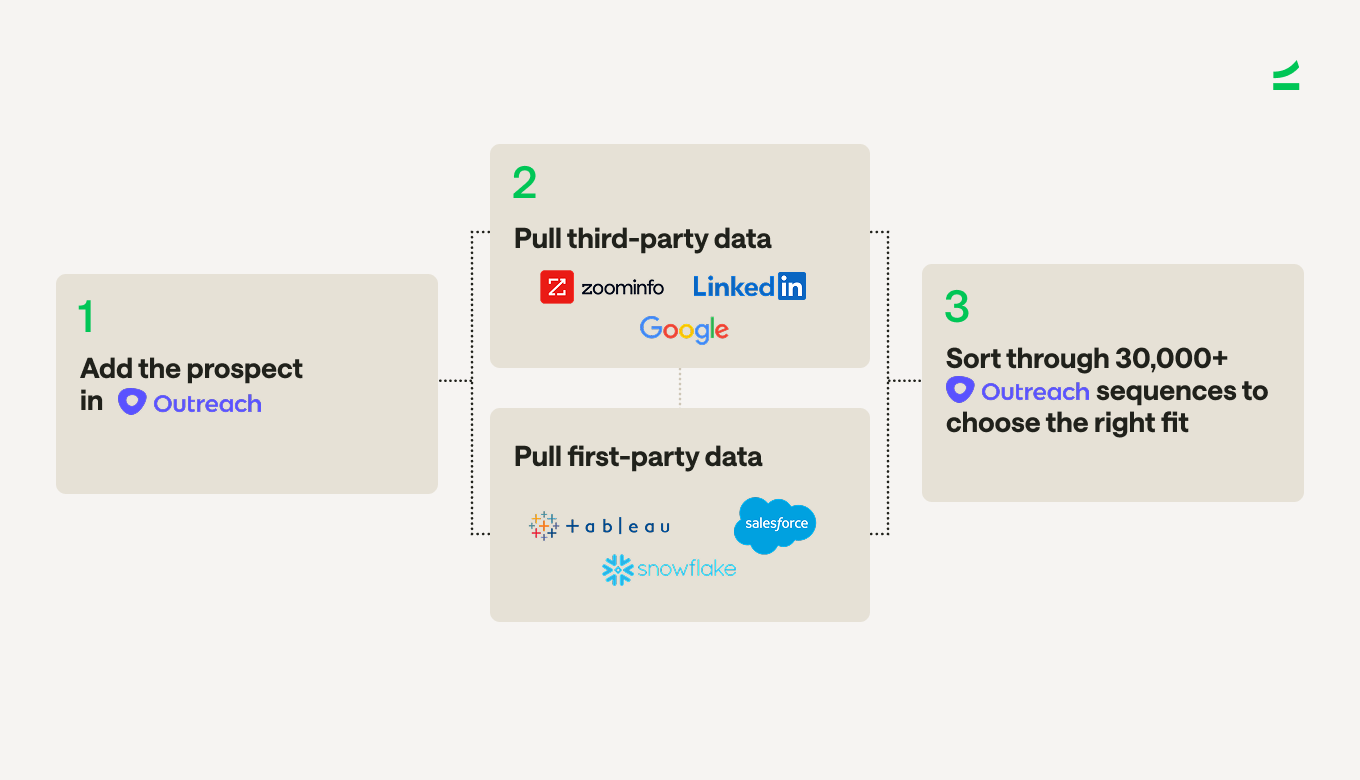
To reach one prospect, an SDR had to:
Add the prospect in Outreach
Pull first-party data from Snowflake, Salesforce, and Tableau
Pull third-party data from ZoomInfo, Google, and LinkedIn
Sort through 30,000+ Outreach sequences to choose the right fit
They repeated these steps dozens of times a day. Over time, reps got tired, skipped research, and reused the same sequences. This led to generic and inaccurate emails that prospects couldn’t relate to.
To fix this, Snowflake rebuilt its workflow using AI and orchestration to automate the most time-consuming parts. The results have been strong: more relevant emails now earn them a 7.6% reply rate (15x higher). What’s more, they’ve booked more than 2,000 meetings from just 55,000 prospects.
At Scale’s GTM AI Summit, Jeff Long, Senior Technical GTM Operations Manager at Snowflake, explained how his 300-person SDR team is using AI orchestration to send better outreach at scale, avoid burnout, and spend more time on pipeline-generating activities.
This article is based on Jeff Long’s presentation at Scale Venture Partners’ GTM AI Summit.
Use AI and orchestration to scale outreach
Many sales teams already use AI to quickly research prospects or draft cold emails. But if you’re just prompting your own LLM instance, you can only do this on one prospect at a time, which isn’t enough to help you manage hundreds of accounts.
Snowflake faced the same limitation. AI could help with individual steps, but it couldn’t support the volume their 300-person SDR team needed.
“We knew that AI could be incredibly powerful for our teams, but how do we make it scale without SDRs actually having to put prompts into a large language model and get these emails out?” says Jeff.
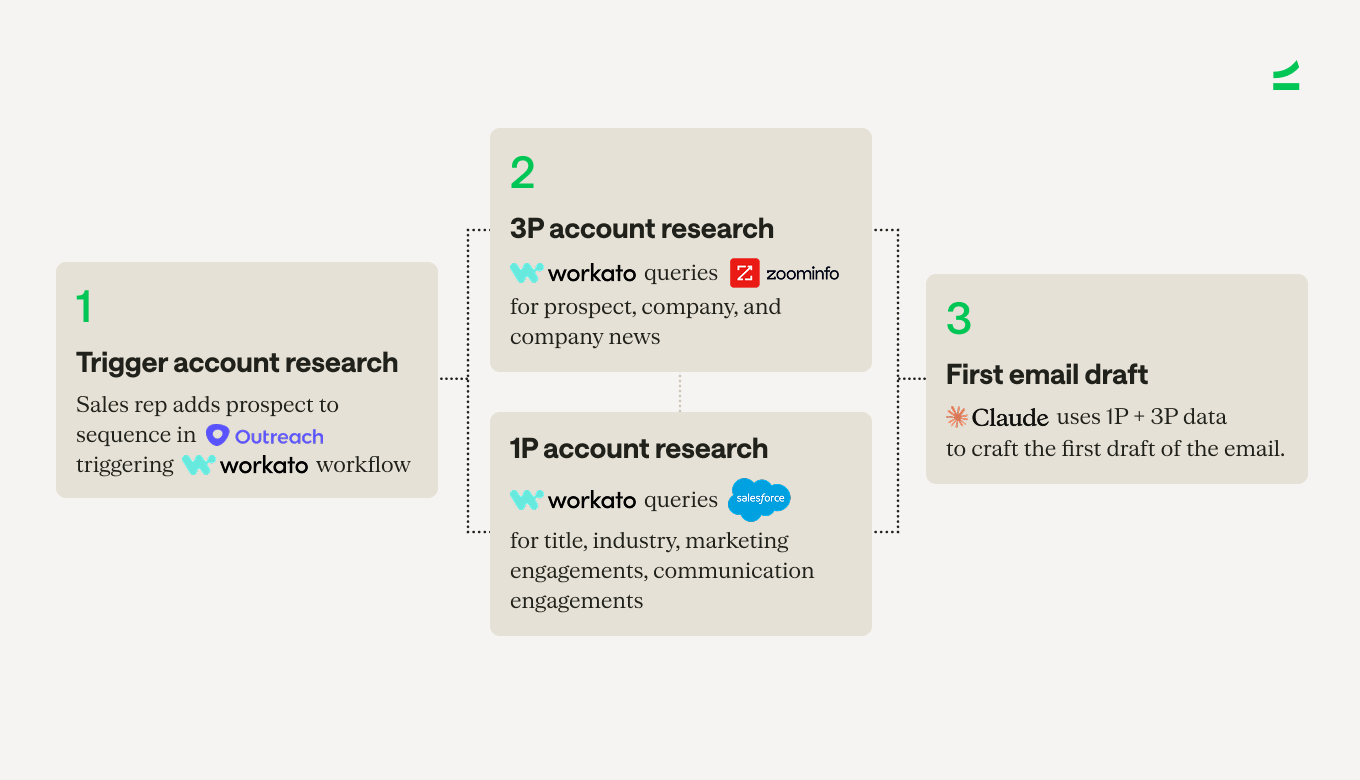
The answer was orchestration; specifically, with the integration platform Workato. Jeff describes Workato as “a layer that sits over your existing tech stack and connects tools that don’t natively talk to each other to perform different tasks one after the other, with the first action triggering each step automatically.”
Orchestration automates the sequence of tasks across your tools so the entire workflow runs on its own.
At Snowflake, this process starts in Outreach. When an SDR adds a prospect to a sequence, Workato pulls first- and third-party data automatically and sends it to Claude to draft the email.
Watch: Jeff describing how this workflow works
Validate your AI email drafts to avoid errors
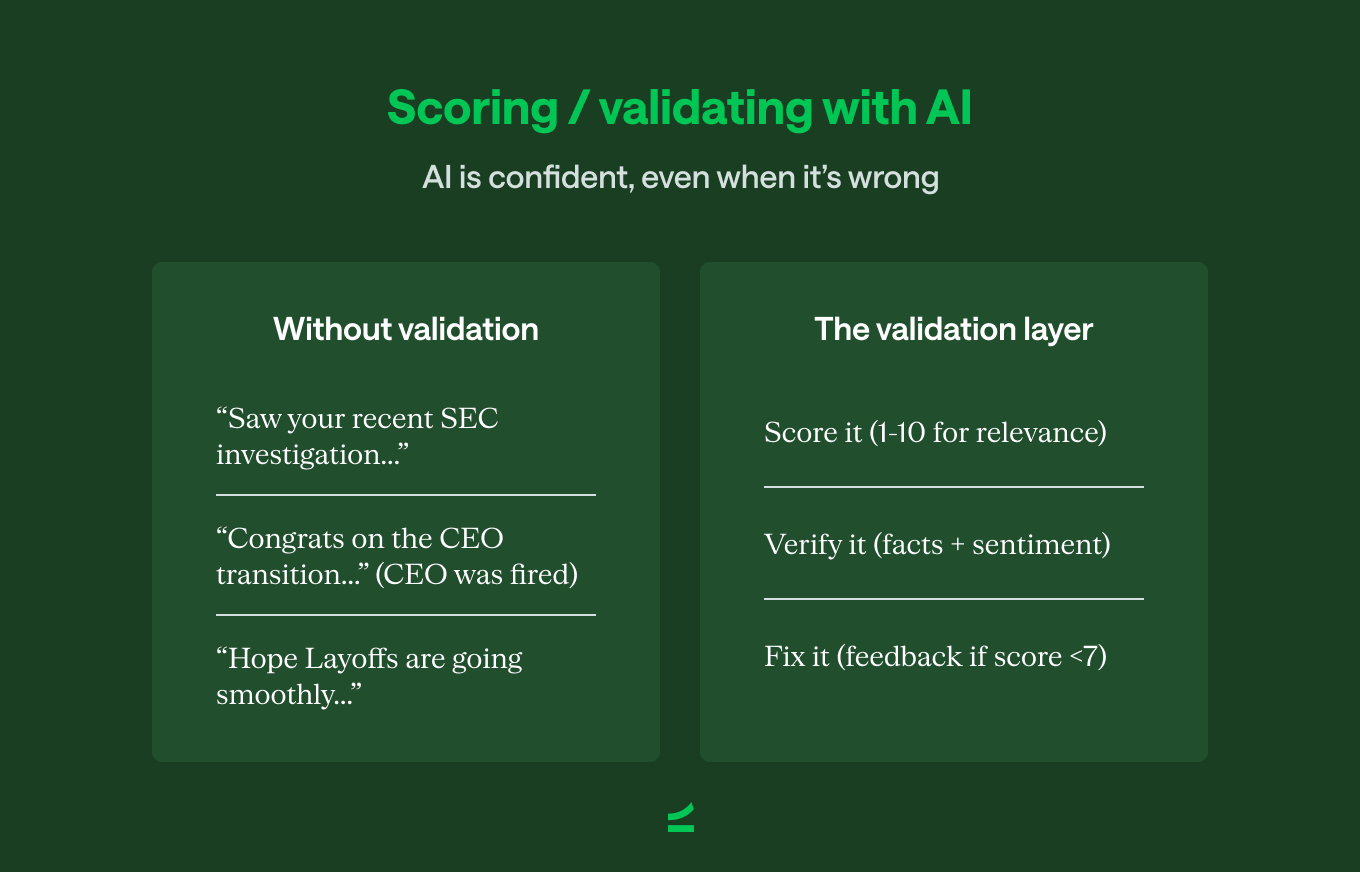
One of the biggest lessons Snowflake’s SDR team learned was not to use the first draft of the email that AI generated. It might be accurate eight times out of 10, but there will always be drafts with irrelevant or inappropriate information. And when you’re prospecting thousands of people, those one-off mistakes add up to hundreds of emails that don’t resonate with the recipient or hurt your reputation.
Watch: Jeff on the importance of verifying emails
To avoid this, Snowflake added a validation layer that gives each email a 1-10 score and flags any draft below a score of seven for review. “The system reviews the draft for accuracy, tone, and sentiment, to make sure it’s right for the person that we’re sending it to,” Jeff says.
Once the rep has validated the email, Workato sends the final draft back into Outreach using XML.
Use XML to tag and extract key information consistently
AI outputs are often inconsistent. Even with good prompts, Claude or ChatGPT may add extra sentences, include headers you don’t need, or format things differently each time. This means you can’t use all the output, just certain parts, which adds back the time you saved from using AI in the first place.
Snowflake solved this by using XML to structure every AI-generated email before sending it back into Outreach. “XML is like a filing system with labeled folders organized into named sections that computers can easily read,” Jeff says. “It adds tags around the important parts of the email, so when you’re loading it back into Outreach, you get consistent outputs every time.”
With XML, the system extracts only the tagged fields—such as the subject line or body—and ignores everything else. This removes extra or unnecessary text and ensures the same structure every time. Instead of reps manually copying and pasting sections from an LLM response, the workflow handles it automatically and consistently across thousands of emails.
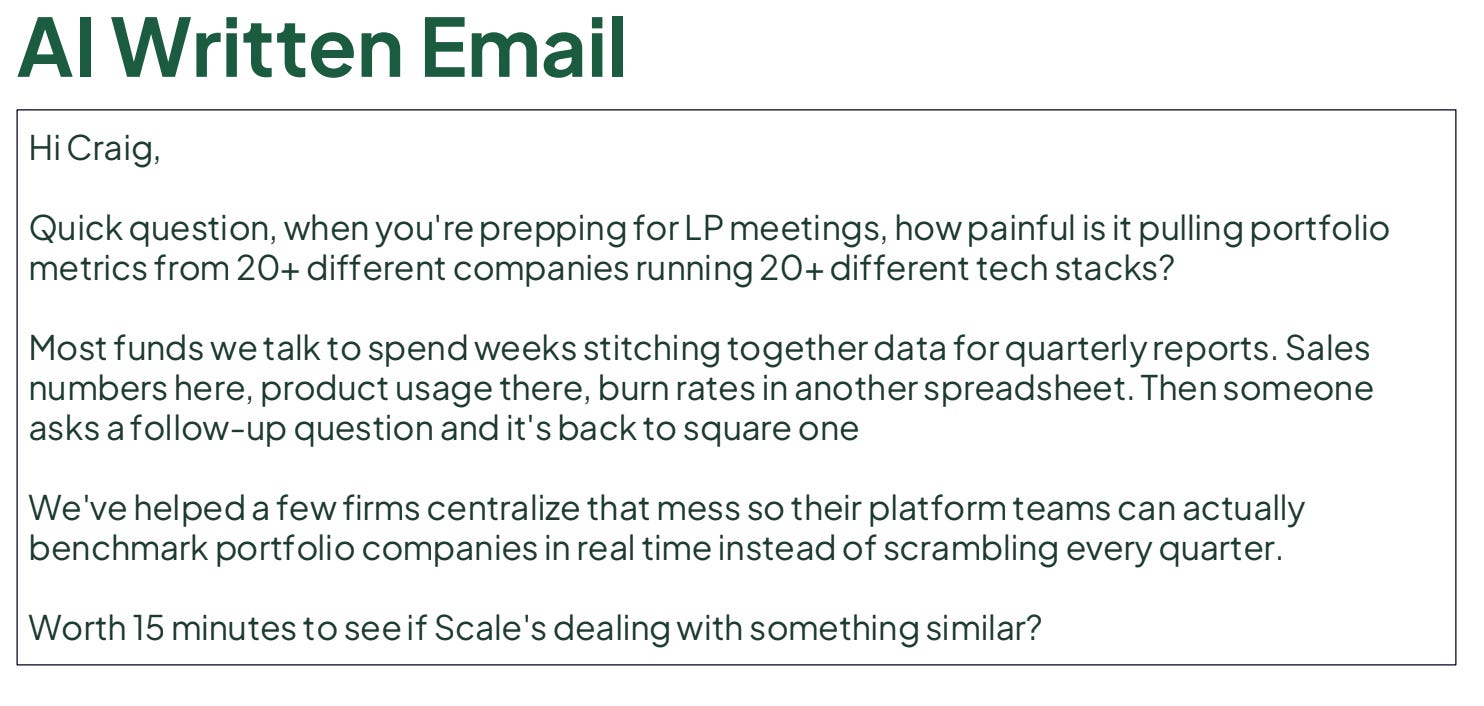
Here’s what an AI-generated email from this workflow looks like. It’s well-researched, relevant, and concise:
What Snowflake’s orchestration workflow looks like today
Snowflake’s orchestration workflow has expanded over time. In addition to drafting emails, the system now generates prospect briefs and call scripts for outbound calls, giving SDRs all the information they need in one place.
Here are examples of the brief and call script:
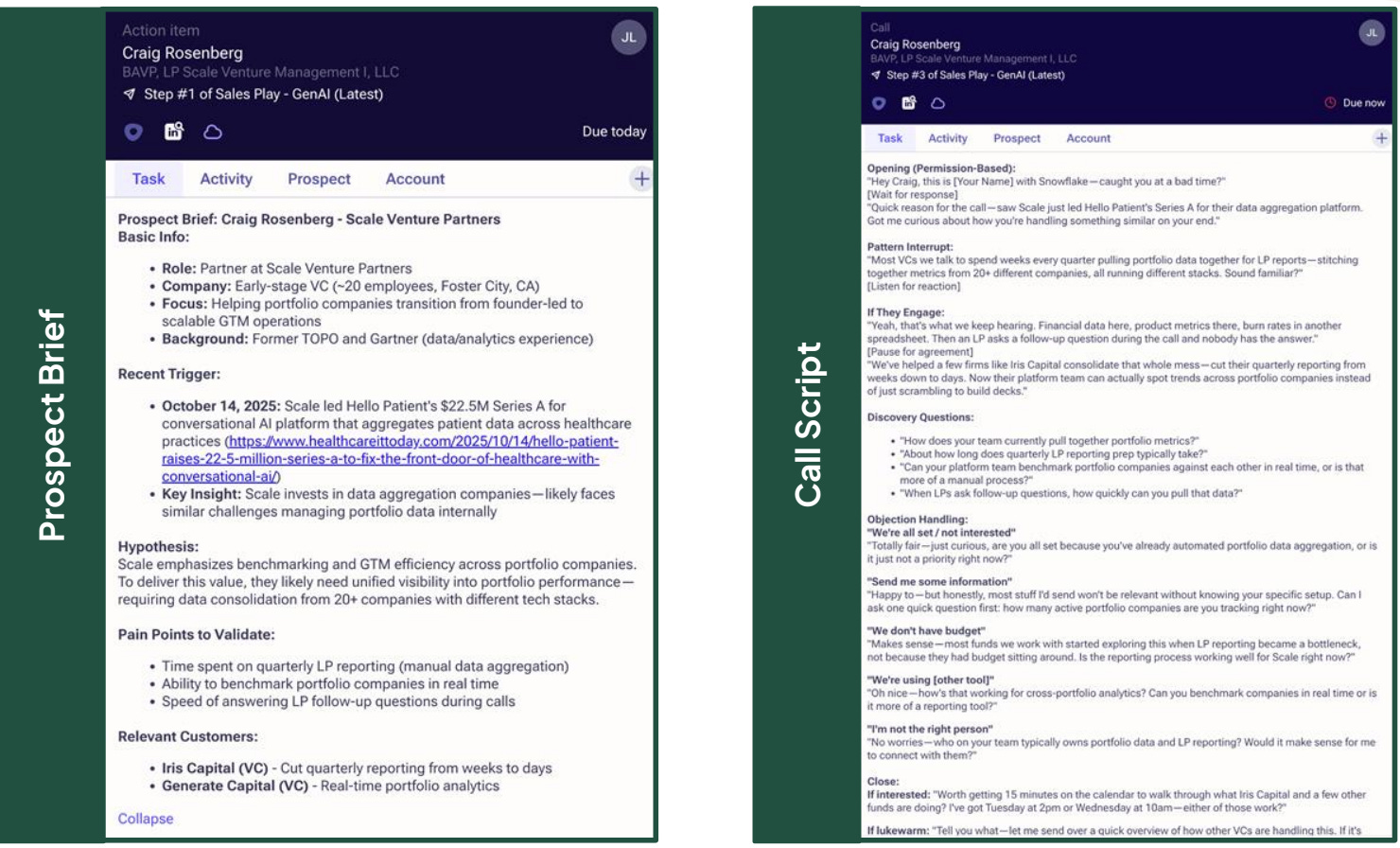
The entire end-to-end process—triggered by one action—replaces hours of manual research and writing for SDRs. Here’s what the advanced workflow looks like:
The SDR adds a prospect to a specific Outreach sequence, and then Workato takes over.
Workato pulls first-party data like product usage, account details, and internal insights an SDR would normally gather.
It pulls third-party data like company news, updates, and contact-level information.
It runs a web search through Bing to collect recent, relevant news.
It uses a Retrieval-Augmented Generation (RAG) workflow in Snowflake to identify relevant customer lookalikes to reference in the email.
Claude drafts the first email using all combined data.
The validation layer scores the email for accuracy, tone, and relevance, and flags anything that needs improvement.
Claude generates follow-up emails, a prospect brief, and a call script to support both email and phone outreach.
XML structures all outputs, and Workato loads them back into Outreach in a clean, consistent format.
This workflow originally took around 10 minutes when models were slower. Today, SDRs can add 20 prospects at once, and the system processes each one in two to three minutes, which is a huge time-saver.
Build specialized prompts to handle one task
A common mistake is asking one prompt to handle the entire workflow: research, summarization, email drafting, and follow-ups. Yes, the current AI models are powerful, but right now they work better when each prompt does one thing well and you orchestrate the tasks together.
So split the workflow into small, single-purpose prompts, each responsible for one clear task, and orchestrate them automatically with Workato or another tool of your choice. This improves the quality of each AI result and reduces how much manual work your team needs to do.
Test new workflows with a pilot team to earn their buy-in
Rolling out a new AI workflow is a major change that affects how reps work every day, so teams need time to understand it and trust it. If the workflow has too many problems at the start, reps will be reluctant to keep using it, and you’ll lose momentum.
Instead of introducing the new process to everyone at once, ease adoption by starting with a pilot team. A pilot helps you see where the workflow breaks, what needs to be adjusted, and what training the rest of the team will need before a full rollout.
Snowflake didn’t send the new workflow to all 300 SDRs on day one. Rather, they started with a pilot group of 10 reps. They created a Slack group, asked the reps to put half of their prospects into the new AI sequence and the other half into their usual sequence, and encouraged them to share what worked and what didn’t.
Because the group was small, reps felt comfortable pointing out problems, asking questions, and suggesting improvements. Their feedback helped Snowflake fix issues with the process and build a better product for reps, before rolling it out to the rest of the team.
AI prospecting is giving Snowflake’s SDRs 100s of hours back
Across most sales teams, SDRs spend a large part of their day on tasks that don’t directly create pipeline. They research accounts, check different tools for context, draft emails from scratch, and manage follow-ups. These tasks are necessary, but they take time away from the work that actually drives meetings and revenue, like cold calling or connecting with company executives.
Jeff explained that this is why he introduced AI and orchestration—to automate the tedious and time-consuming work that slows SDRs down. “We have no plans to get rid of our SDR teams or slow hiring. We want to automate some of their tasks so they have time to do all the other things they’re falling behind on,” Jeff says.
And with the manual work handled automatically, SDRs now spend more of their day on high-value outreach and also send far more relevant and personalized emails which has led to higher reply rates and more meetings booked.
AI hasn’t replaced SDRs and won’t anytime soon. But paired with orchestration, it makes SDR teams more productive and helps them hit targets faster.
More from the GTM team
Craig Rosenberg on the State of GTM AI, published on Pavilion’s new GTM blog Topline (ICYMI, check out the full report here)
Kristina McMillan on the evolution of AI SDRs, where they can be used to improve top-of-funnel efficiency, and what still needs the human touch, at least for now.
Robert Koehler on using AI to coach reps on discovery, including the full prompts that dropped evaluation and reporting time from two to three weeks to two days